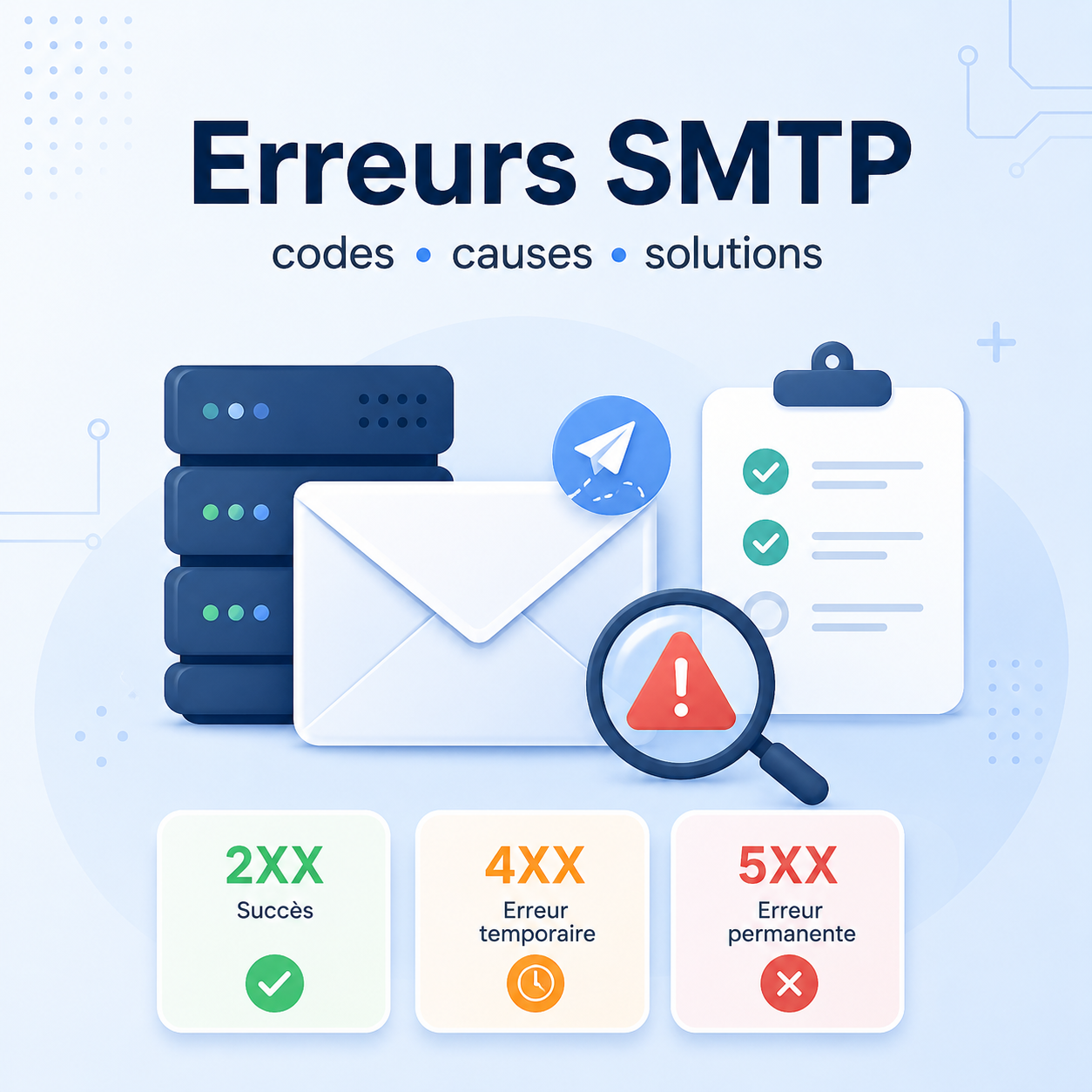
An SMTP error is the response returned by a mail server when it accepts, delays or rejects an email. You may see it in a bounce, server log, marketing platform or helpdesk system.
This guide is a practical reference for understanding an SMTP code, deciding whether it is temporary or permanent, identifying the likely cause and choosing the right corrective action. The same code can vary across Gmail, Outlook, Exchange, SMTP relays and security gateways, so always read the code, the extended code and the full text.
Direct answer: how should you read an SMTP error?
Start with the code family: 2xx means the command or message was accepted, 4xx indicates a temporary problem, and 5xx usually means a permanent rejection. Then look for an extended code such as 5.1.1, 5.7.1 or 5.7.26, and read the full error text.
A reliable diagnosis combines six elements:
- the main code, for example
550; - any extended code, for example
5.7.1; - the complete error message;
- email headers or SMTP logs;
- sending context: tool, volume, domain, IP and recipient;
- authentication and reputation: SPF, DKIM, DMARC, PTR, blacklist and complaints.
An SMTP 550 error does not have one universal cause. It may relate to the recipient, the receiving domain’s policy, reputation, authentication or content.
In short
2xx: success or server acceptance.4xx: temporary error, usually worth monitoring before heavy remediation.5xx: permanent rejection, usually requiring a fix before resending.5.1.x: often related to the address or recipient.5.7.x: often related to policy, security, authentication or reputation.- A bounce should always be read with its full text, not only with the code.
Difference Between SMTP 2xx, 4xx and 5xx Codes
Before looking for a fix, identify the SMTP code family. This first reading tells you whether the message was accepted, whether the server will likely retry later, or whether the error is permanent.
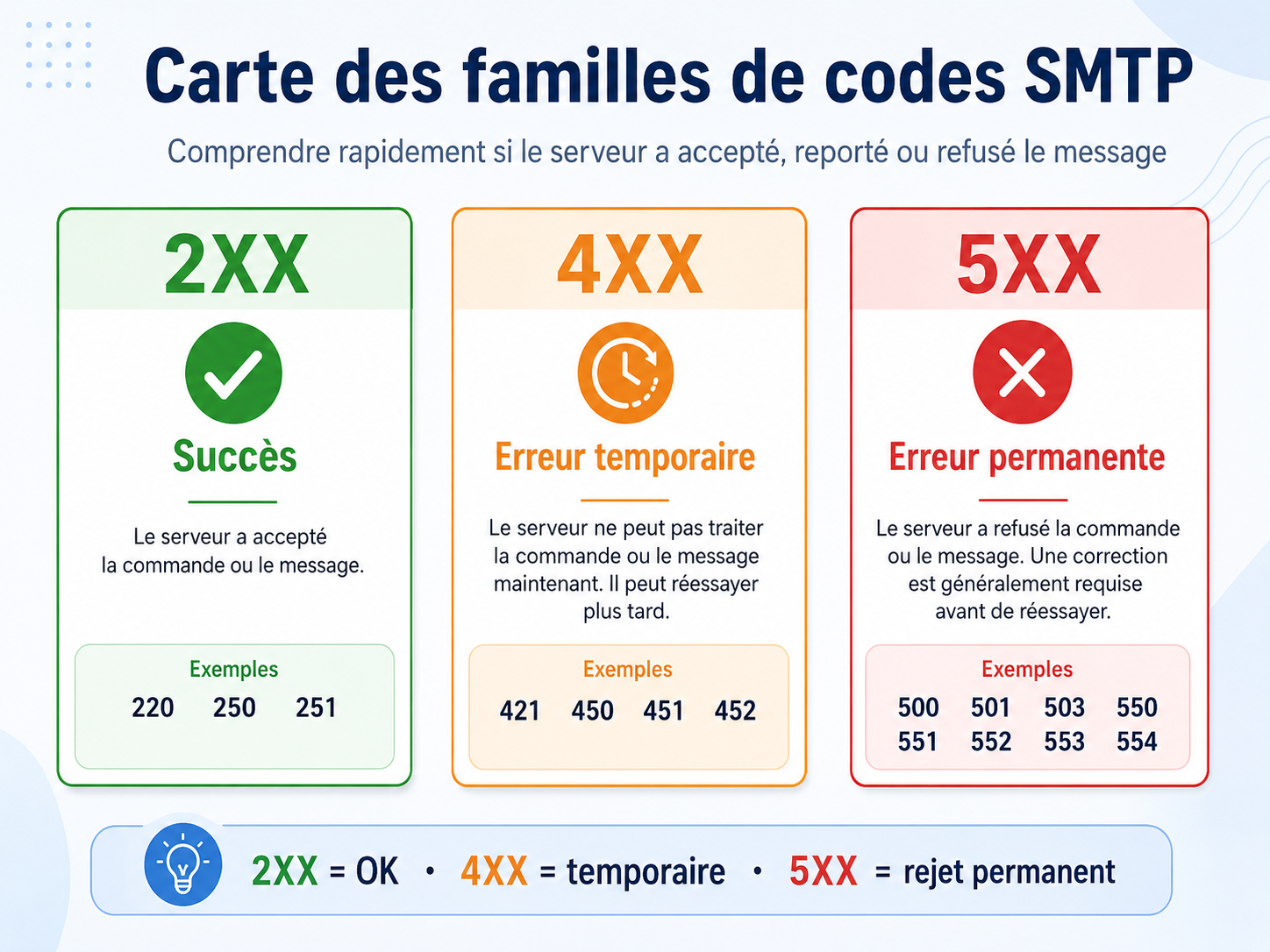
A 4xx code should generally be treated as temporary: saturation, server unavailability, throttling or a mailbox that cannot be reached for now. A 5xx code more often requires a fix: invalid address, missing authentication, degraded reputation or a security policy.
Main Table of Common SMTP Errors
The table below gives a practical reading. It does not replace the exact message from the receiving server: two servers may use the same code with different wording and policies.
| SMTP code | Type | Meaning | Common causes | Recommended action | Priority |
|---|---|---|---|---|---|
220 | Success | Server ready to start an SMTP session. | Normal connection opening. | No fix needed; useful to confirm that the server responds. | Info |
250 | Success | Command or message accepted. | Message accepted by the relay or receiving server. | Keep logs if you are troubleshooting a later delivery step. | Info |
421 | Temporary / Network / server | Service temporarily unavailable. | Maintenance, overload, throttling, DNS issue or remote server outage. | Let automatic retries work, check logs and monitor duration. | Monitor |
450 | Temporary / Recipient | Mailbox or recipient temporarily unavailable. | Locked mailbox, greylisting, temporary rule, account transition. | Retry later and check whether other recipients at the domain are affected. | Monitor |
451 | Temporary / Network / server | Temporary local processing error. | Processing issue, temporary filter, slow DNS, antivirus or gateway outage. | Monitor retries; contact the administrator if it persists. | Monitor |
452 | Temporary | Insufficient storage or temporary limit. | Full mailbox, server quota, saturated queue, oversized message. | Reduce message size or wait for quota to be freed. | Fix soon |
500 | Permanent / Network / server | Command not recognized. | Incompatible SMTP client, protocol error, proxy or relay misconfiguration. | Check the client, SMTP relay, TLS and command syntax. | Fix soon |
501 | Permanent | Invalid syntax. | Malformed address, invalid command, wrong SMTP parameter. | Fix the address, sender format or tool configuration. | Fix soon |
502 | Permanent / Network / server | Command not implemented. | SMTP feature not supported by the server. | Adjust the client or disable the unsupported option. | Fix soon |
503 | Permanent | Bad sequence of commands. | Authentication sent at the wrong time, missing MAIL FROM or RCPT TO. | Fix the SMTP client or sending script configuration. | Fix soon |
530 | Authentication | Authentication required. | Relay not allowed, SMTP AUTH required, TLS required before login. | Enable authentication and verify port, TLS and account permissions. | Critical |
535 | Authentication | Authentication failed. | Wrong password, MFA, SMTP AUTH disabled, blocked account, broken OAuth setup. | Fix credentials and check MFA/OAuth plus Microsoft 365 or Google Workspace policies. | Critical |
550 | Permanent | Generic permanent rejection. | Unknown address, antispam policy, reputation, content, authentication or relay denial. | Read the extended code and full text before resending. | Critical |
550 5.1.1 | Recipient | Unknown recipient. | Deleted address, typo, missing alias, routing issue. | Fix or remove the address; confirm through another channel if needed. | Fix soon |
550 5.7.1 | Reputation / policy | Message refused for policy, reputation or security reasons. | SPF/DKIM/DMARC, suspicious IP, filtered content, blacklist, recipient rule. | Check authentication, reputation, headers, content and provider guidance. | Critical |
550 5.7.26 | Authentication / Reputation / policy | Authentication failure or non-compliance according to the recipient. | Non-aligned DMARC, missing DKIM, inconsistent SPF, domain not meeting receiver requirements. | Fix SPF, DKIM, DMARC and visible-domain alignment. | Critical |
551 | Recipient | User not local or forwarding required. | Wrong server, outdated routing, external forwarding not accepted. | Verify domain, MX, real address and routing. | Fix soon |
552 | Recipient / Permanent | Full mailbox or message too large. | Quota exceeded, attachment too large, server size limit. | Reduce size, send a secure link or ask the recipient to free space. | Fix soon |
553 | Permanent | Invalid sender or recipient address. | Invalid format, forbidden domain, inconsistent MAIL FROM envelope. | Fix addresses, sending domain and SMTP envelope configuration. | Fix soon |
554 | Reputation / policy | Transaction refused. | Antispam, suspicious content, weak reputation, local policy, relay denied. | Read the exact text and check reputation, authentication, content and sending IP. | Critical |
554 5.7.1 | Reputation / policy | Rejected for spam, blacklist or security policy. | Listed IP or domain, spam complaints, risky content, SPF/DKIM/DMARC non-compliance. | Stop repeated bulk retries, fix the cause, then test gradually. | Critical |
Step-by-Step Diagnostic Method
Reliable troubleshooting avoids premature conclusions. Do not fix SPF, content and DNS at the same time, or you will not know which change produced the result.
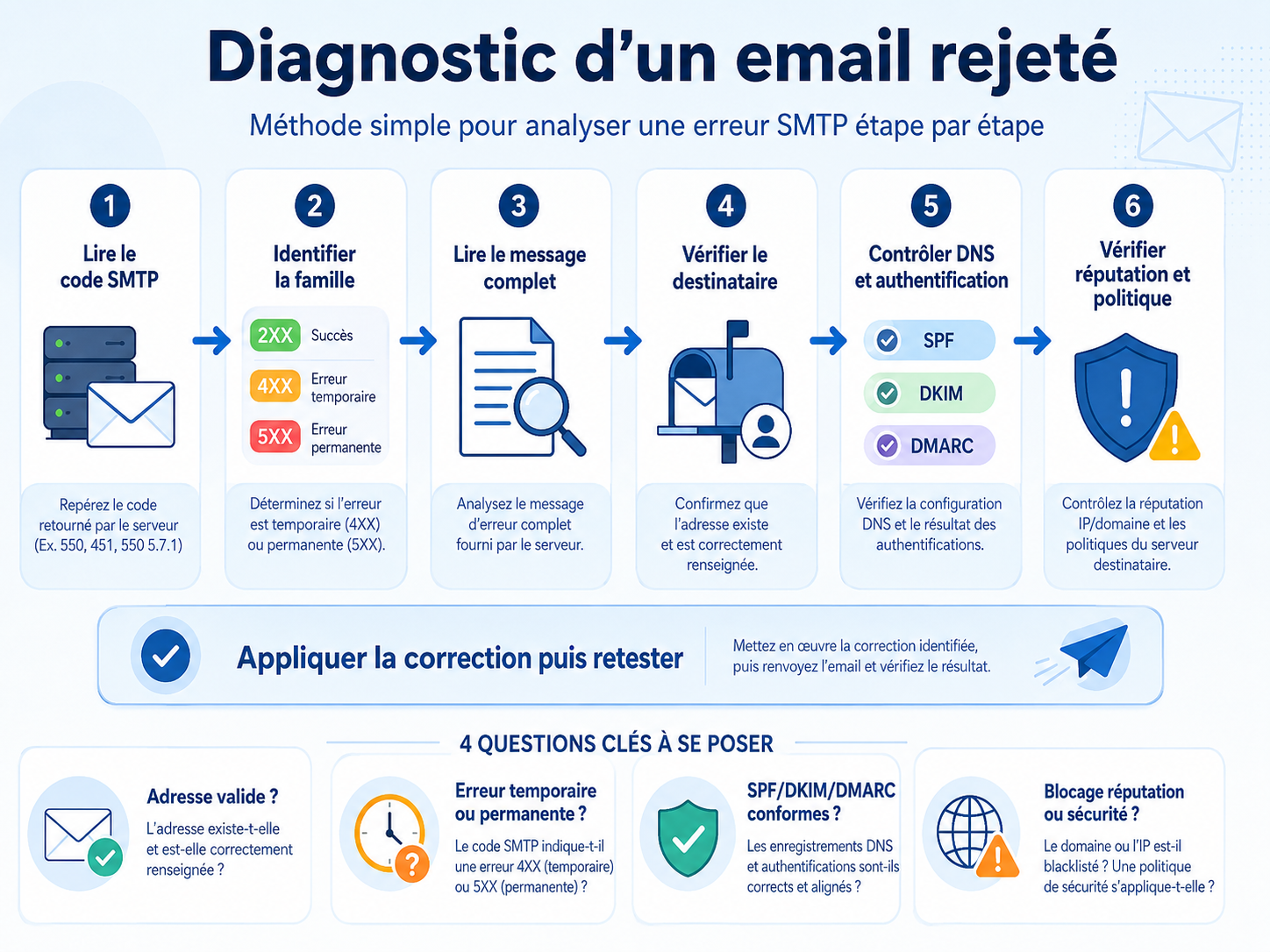
Use this order:
- Copy the complete bounce, not only the first line.
- Classify the code as
2xx,4xxor5xx. - Capture the extended code, such as
5.1.1,5.7.1or5.7.26. - Identify the recipient domain: Gmail, Outlook, corporate server or security gateway.
- Check whether the rejection affects one recipient, one whole domain or several providers.
- Verify SPF, DKIM and DMARC from received headers or SMTP logs.
- Review reputation: complaints, recent bounces, volume, blacklist, new IP or new domain.
- Apply one fix, test, and document the result.
For authentication topics, start with How to Configure SPF, DKIM and DMARC Without Breaking Email Delivery, then use DMARC XML reports to identify real senders.
Authentication and Reputation Errors
Errors 530, 535, 550 5.7.1, 550 5.7.26 and 554 5.7.1 deserve quick attention. They may involve SMTP login, but also domain identity: SPF, DKIM, DMARC, alignment, PTR, HELO/EHLO or IP reputation.
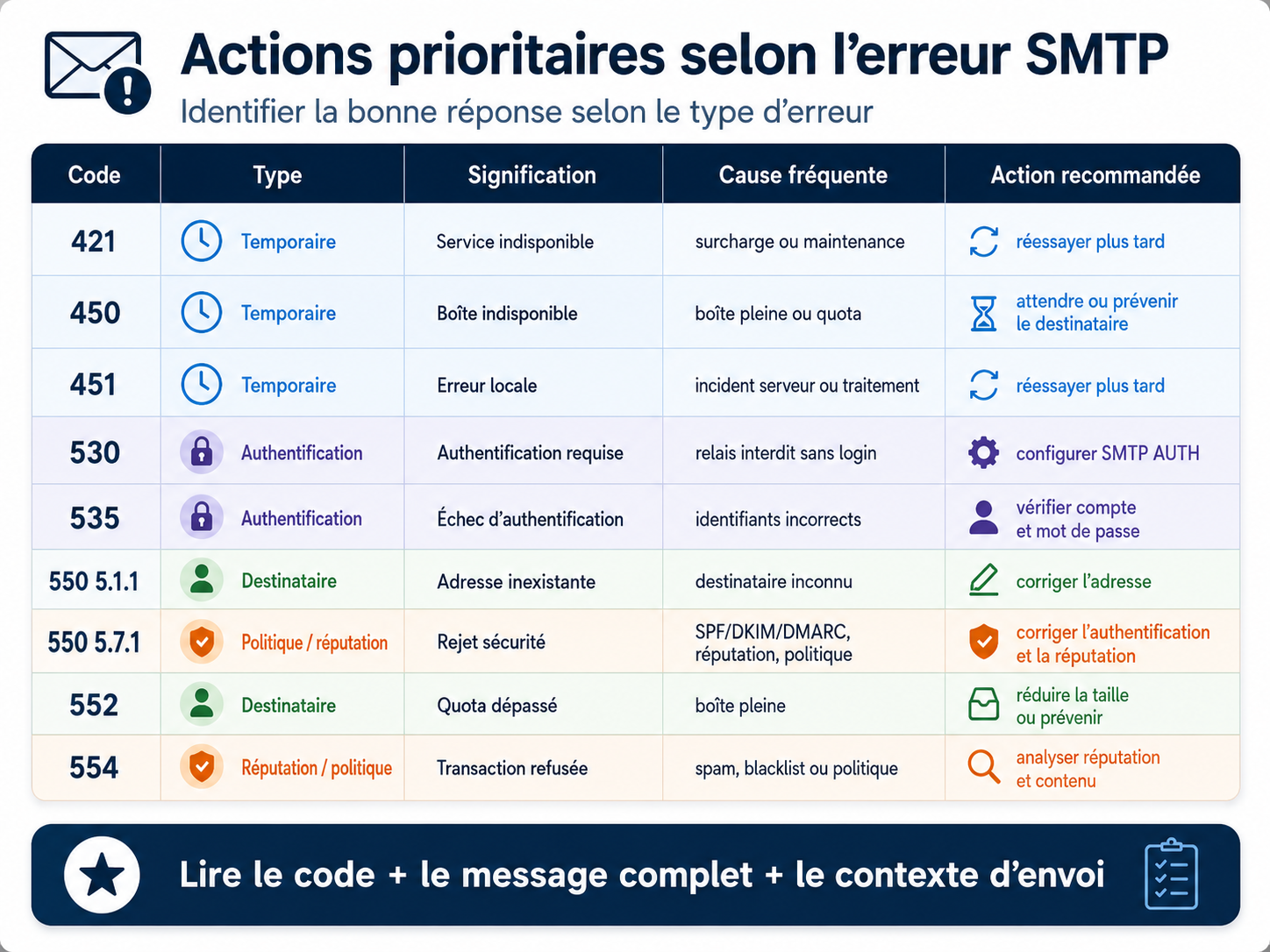
If Gmail or Outlook rejects a message with a 5.7.1 variant, check reputation signals as well. Google Postmaster Tools helps monitor Gmail reputation, while Why Do My Emails Land in Spam or Gmail Promotions? provides a broader diagnostic method.
Recipient-Related Errors
Codes 550 5.1.1, 551, 552 and sometimes 553 often point to the recipient or address. The cause may be simple: typo, deleted alias, full mailbox, migrated domain or incorrect MX routing.
Before blaming your infrastructure, test another recipient at the same domain and an external recipient. If only one contact fails with 5.1.1, clean the list. If the whole domain fails, investigate DNS, routing, reputation or a local policy.
Server or Network Errors
Errors 421, 451, 452, 500, 502 and 503 may come from a relay, SMTP client, firewall, security gateway or receiving server. Interpret them with logs.
A single 421 may disappear without action. Repeated 421 responses toward the same provider may indicate throttling, a volume spike or weak reputation. If you use a marketing platform, a dedicated sending subdomain makes incidents easier to isolate.
Diagnostic Checklist
- Copy the complete bounce and exact error text.
- Identify the main code and extended code.
- Classify the error: temporary, permanent, authentication, reputation, recipient, server or network.
- Check whether the problem affects one contact, one domain or several providers.
- Verify SPF, DKIM, DMARC, PTR, HELO/EHLO and alignment.
- Review recent changes: DNS, migration, new platform, volume, content or contact list.
- Monitor retries for
4xxcodes. - Stop repetitive resends after critical
5xxerrors. - Document the fix and retest toward Gmail, Outlook and a neutral domain.
FAQ
What does SMTP error 550 mean?
SMTP 550 usually means a permanent rejection. It may indicate an unknown recipient, a policy violation, insufficient reputation or non-compliant authentication. The extended code and full text are essential.
What is the difference between SMTP 4xx and 5xx errors?
A 4xx error is temporary and the sending server may retry automatically. A 5xx error is permanent and should be fixed before resending, otherwise you may increase bounces or damage reputation.
What does SMTP 5.7.1 mean?
5.7.1 often refers to a security policy, antispam rule, insufficient reputation or authentication failure. It is not a single root cause: Gmail, Outlook and corporate gateways may use it differently.
What should I do if Gmail or Outlook rejects an email?
Read the full bounce, then check SPF, DKIM, DMARC, alignment, PTR, reputation, volume and content. For Gmail, review Google Postmaster Tools. For Outlook, inspect Microsoft policy wording and your relay logs.
Does an SMTP error always come from the sender?
No. It may come from the recipient, a full mailbox, a local rule, a temporary outage, incorrect DNS routing or an intermediate server. Compare several recipients and several providers.
How can I tell whether the recipient is the problem?
Strong indicators include 550 5.1.1, unknown user wording, full mailbox wording or account-specific rules. If other contacts at the same domain receive your messages correctly, the problem is probably local to that recipient.
Should I resend after a temporary SMTP error?
Yes, but let the server handle automatic retries. Immediate manual resending rarely helps. If a 4xx code persists, investigate saturation, throttling, greylisting or a network issue.
When should SPF, DKIM and DMARC be checked?
Check them whenever a bounce mentions 5.7.1, 5.7.26, authentication, DMARC, SPF, DKIM, unauthenticated mail, policy or suspicious sender. Also verify alignment with the domain visible in the From header.
Conclusion
An SMTP code list is useful, but real troubleshooting comes from context: main code, extended code, full text, headers, reputation, authentication and recipient state. Dharmail can help turn these errors into a concrete action plan: bounce analysis, SPF/DKIM/DMARC remediation, Gmail/Outlook reputation and sending-subdomain architecture. Contact Dharmail to investigate email rejections without breaking legitimate flows.