A practical diagnostic method for spam, Gmail Promotions, rejection, reputation, content, engagement and authentication. The objective is simple: separate spam, Promotions, rejection, quarantine, reputation, content and engagement, without breaking legitimate business email. This guide favors a cautious, documented and measurable method for SMBs, IT teams, marketing owners and executives.
Direct answer: identify real sending flows, check DNS records, apply fixes one by one, test toward Gmail and Outlook, then observe results before enforcement. For this topic, the guiding principle is to separate spam, Promotions, rejection, quarantine, reputation, content and engagement.
Key takeaway: Do not change a critical DNS record before understanding which tool uses it. A technically correct fix can interrupt invoices, notifications, web forms or campaigns when the flow was not inventoried.
In short
- A good diagnosis starts with real flows, not assumptions.
- DNS changes should be dated, tested and reversible.
- Gmail and Outlook react to technical setup, but also to reputation and engagement.
- A progressive method protects deliverability and business workflows.
Diagram: qualify the symptom before acting
Promotions placement, spam placement, rejection and missing mail require different diagnostics.
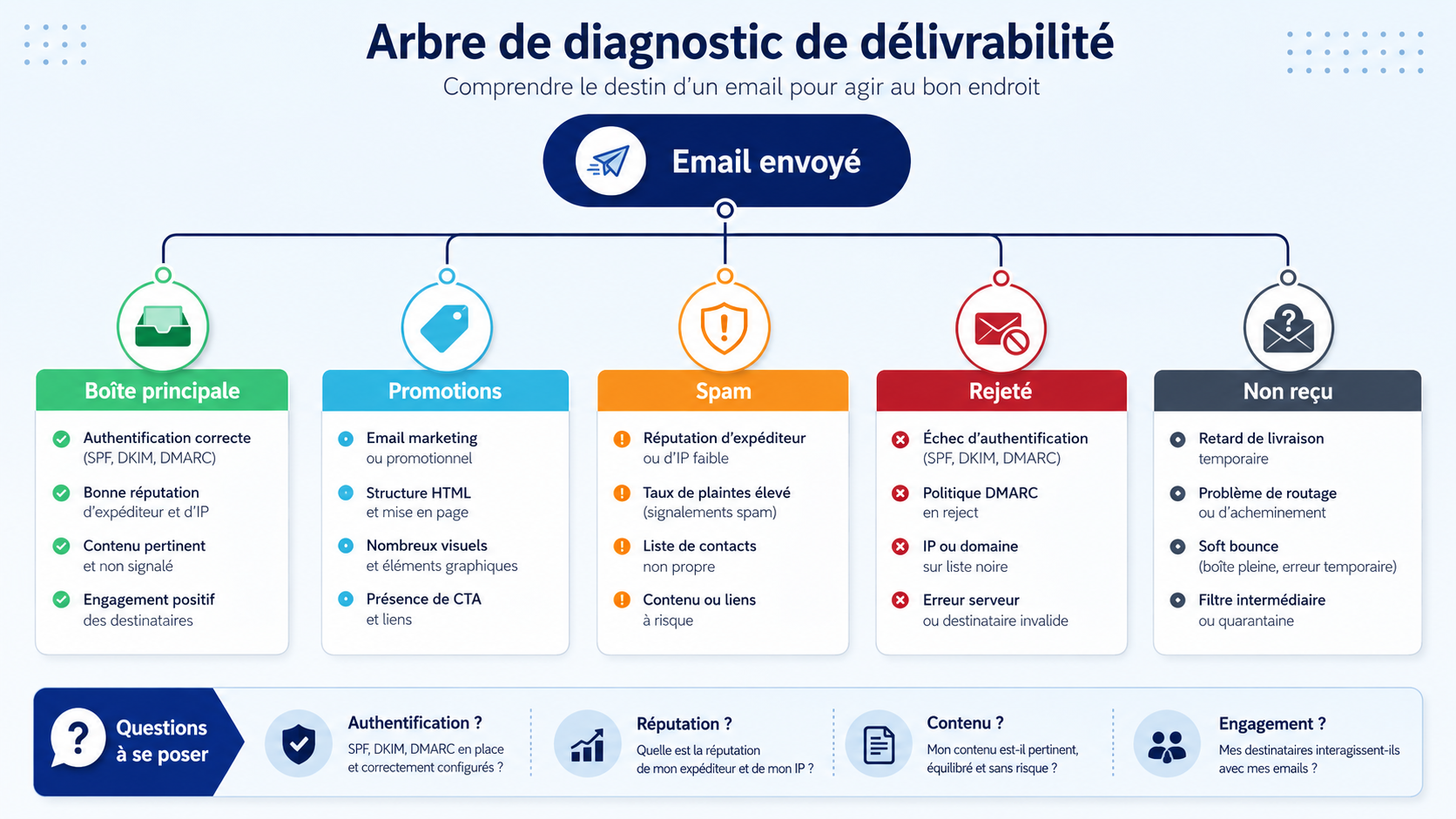
Email placement depends on technical, reputation, editorial and behavioral factors.
Start by naming the exact symptom. A newsletter in Promotions can be normal, while SMTP rejection or widespread spam placement indicates a different risk.
Diagram: signals evaluated by Gmail
Gmail does not classify a message based on one word or one technical test. It combines many signals.
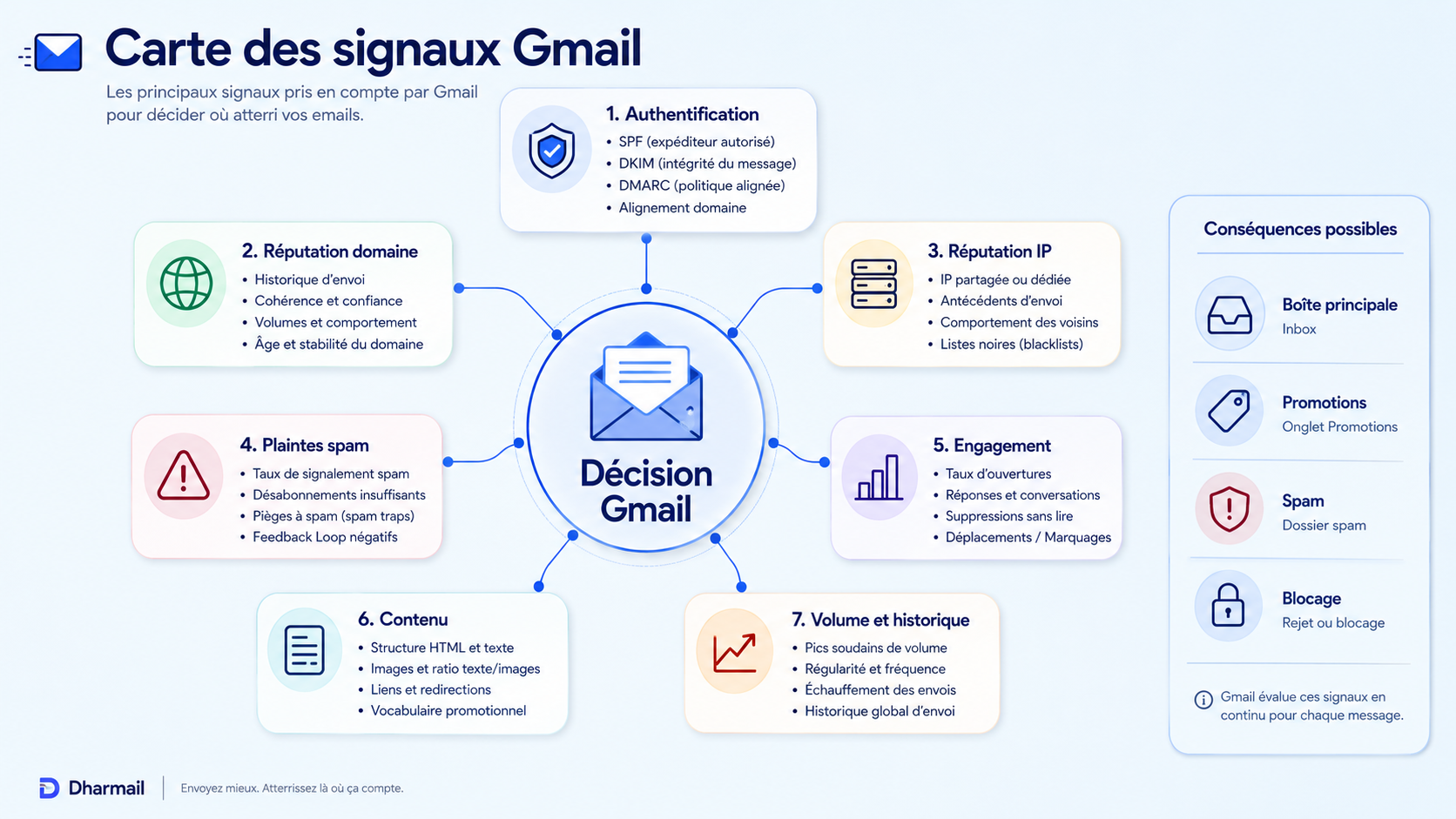
Gmail continuously evaluates authentication, reputation, complaints, engagement, content and sending history.
A correctly authenticated domain can still suffer from poor reputation or weak engagement. Conversely, a good list will not compensate for broken authentication.
Diagram: organize the diagnosis
To avoid random fixes, classify possible causes into families.
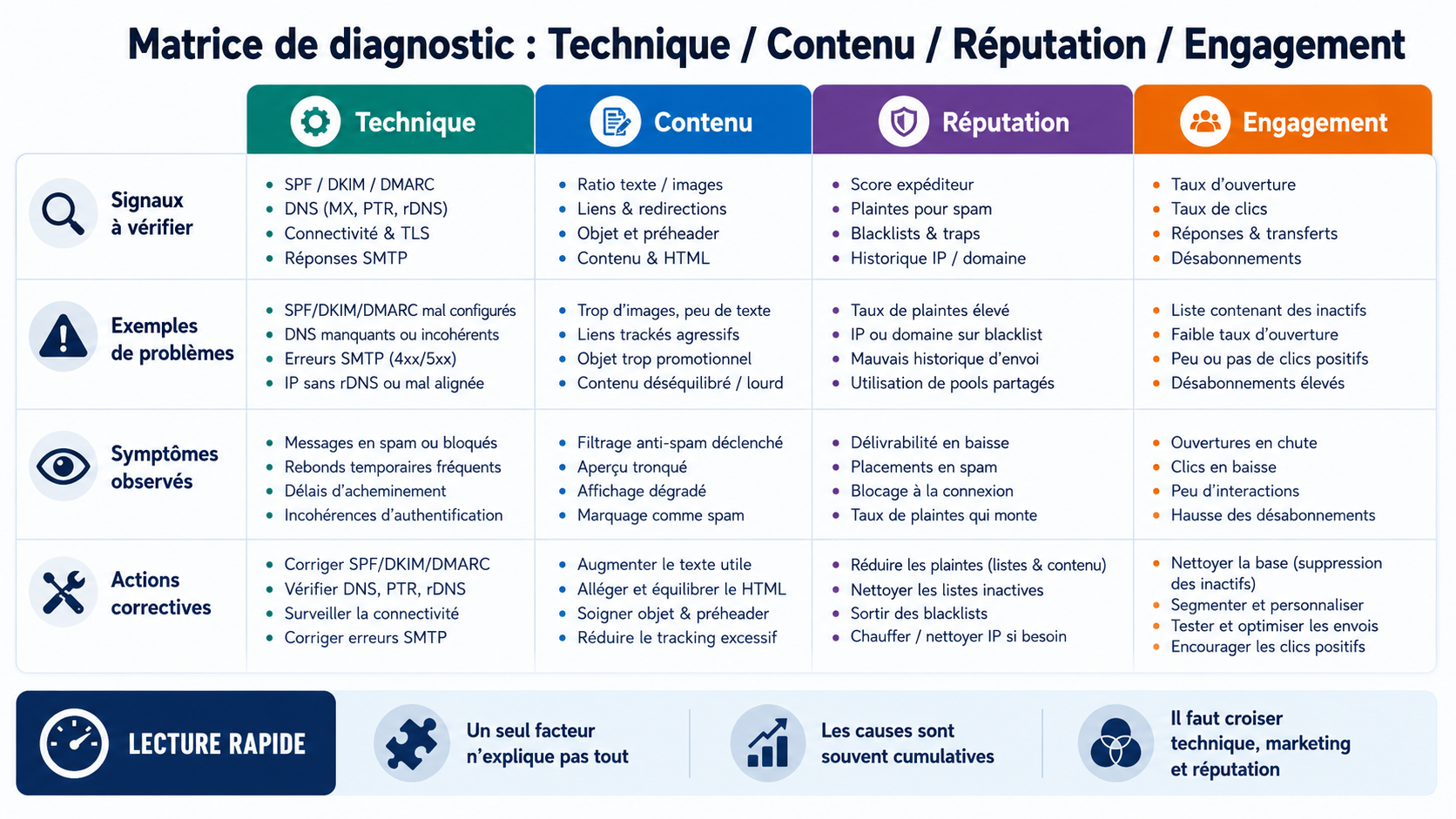
Deliverability problems are rarely caused by one factor: compare technical setup, content, reputation and engagement.
This matrix helps prioritize. Fix blocking technical issues first, then measure reputation and behavioral signals over several days.
Diagram: control a test email
A useful test is more than checking whether a message arrived in a personal mailbox.
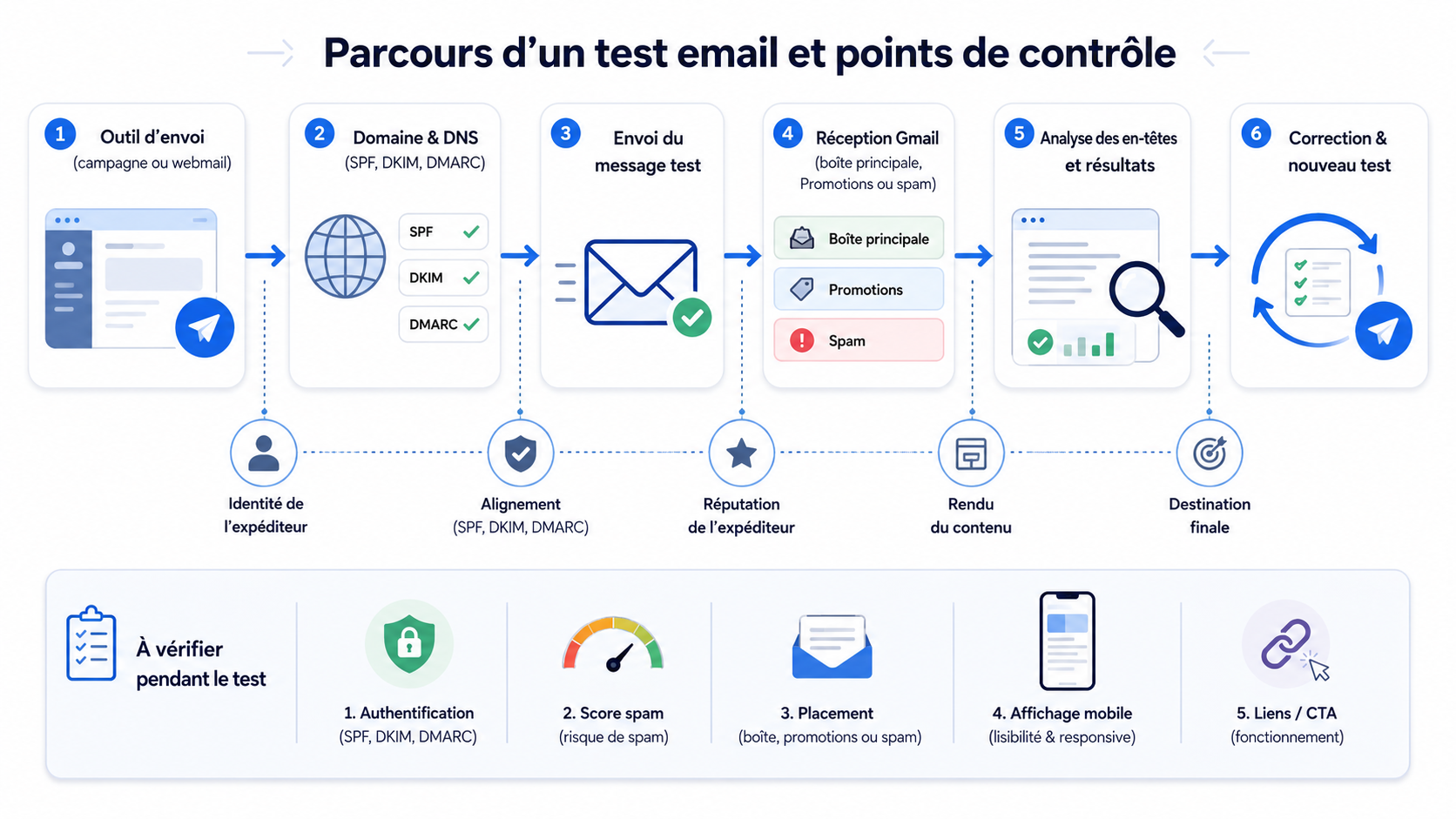
A test email should check authentication, placement, rendering, links and final destination.
Keep headers, date, sending domain and tested segment. Without that evidence, the test is hard to compare after remediation.
When should you use this method?
Use this method when the domain sends from several platforms, when deliverability drops, or before enforcing a stricter DMARC policy. It is also useful after a Microsoft 365, Google Workspace, CRM or marketing platform migration.
It also applies to organizations that want to strengthen email authentication before a customer audit, DNS migration, platform change or major campaign.
Step-by-step procedure
| Step | Action | Validation |
|---|---|---|
| 1 | Map real sending flows, including website, CRM, invoicing, support, marketing and collaboration mailbox. | Documented check |
| 2 | Check DNS records before changing them and keep a dated copy of the initial state. | Documented check |
| 3 | Apply the fix on a limited scope with a clear observation window. | Documented check |
| 4 | Test critical messages toward Gmail, Outlook and a neutral external mailbox. | Documented check |
| 5 | Compare technical results with business feedback: inboxing, spam, promotions, rejections and bounces. | Documented check |
| 6 | Document the decision, tool owners and next review date. | Documented check |
Concrete DNS example
Always adapt values to the real provider. Never copy a DNS example without checking the domain, DKIM selector, report address and expected policy.
example.com. TXT "v=spf1 include:spf.protection.outlook.com include:example-esp.net -all"
selector1._domainkey.example.com. CNAME selector1-example-com._domainkey.provider.example.
_dmarc.example.com. TXT "v=DMARC1; p=none; rua=mailto:dmarc@example.com; adkim=s; aspf=s"
Business deliverability precautions
Do not change a critical DNS record before understanding which tool uses it. A technically correct fix can interrupt invoices, notifications, web forms or campaigns when the flow was not inventoried.
Deliverability does not depend only on SPF, DKIM or DMARC. Complaints, bounces, list quality, volume, campaign consistency and content clarity also matter. Connect this tutorial with audit and deliverability services.
Short definitions
- SPF : DNS record that authorizes servers to send for a domain.
- DKIM : cryptographic signature proving message integrity.
- DMARC : policy that checks alignment and requests an action on failure.
- Sending domain : visible or technical domain used by a platform to send.
- Domain reputation : trust level built by providers from sending history.
Useful internal links
- Dharmail
- audit and deliverability services
- Dharmail blog
- How to Configure SPF, DKIM and DMARC Without Breaking Email Delivery
- How to Read a DMARC XML Report and Identify Who Sends Email From Your Domain
- How to Create a Sending Subdomain for Brevo, ActiveCampaign or Mailjet
- How to Set Up and Use Google Postmaster Tools to Monitor Email Reputation
Final checklist
- Map real sending flows, including website, CRM, invoicing, support, marketing and collaboration mailbox.
- Check DNS records before changing them and keep a dated copy of the initial state.
- Apply the fix on a limited scope with a clear observation window.
- Test critical messages toward Gmail, Outlook and a neutral external mailbox.
- Compare technical results with business feedback: inboxing, spam, promotions, rejections and bounces.
- Document the decision, tool owners and next review date.
- Monitor results for several days.
- Document the date, owner and reason for every change.
Operational validation method
After every change, create a short control sheet. Record the domain, the modified tool, the DNS record, the change time, the expected result and the person responsible. This avoids confused troubleshooting when several teams work on the same DNS zone or sending platform.
Then send three types of messages: a human email from the primary mailbox, an application message from the website or CRM, and a marketing message if a campaign platform is involved. Check the full received headers, not only the inbox placement. SPF, DKIM and DMARC lines show whether the message passes technically and whether the visible domain remains aligned.
Finally, monitor business signals. Lower replies, higher bounces, unusual complaints or customer feedback should be compared with the change date. This simple discipline helps you fix issues quickly without changing too many variables at once. For an SMB, it is often the difference between controlled improvement and a confusing series of tests.
Use the same review rhythm for the following two weeks. Check whether the same providers keep passing authentication, whether complaint signals remain stable, and whether business teams report fewer placement issues. If a new tool appears, do not add it blindly to SPF. First confirm the owner, sending purpose, DKIM support, visible From domain and expected volume. This keeps the setup understandable for future audits.
When the domain is used by sales, finance or customer support, schedule the change outside peak business hours and inform the people who receive customer replies. Their feedback is often the fastest way to spot a legitimate flow that technical dashboards did not reveal.
FAQ
How long should monitoring last before enforcement?
For an SMB, two to four weeks often provide a useful baseline. The window should include campaigns, invoices, reminders, notifications and rarely used tools.
Can everything be fixed in DNS?
No. DNS exposes authorization and authentication, but it does not replace configuration inside Microsoft 365, Google Workspace, the CRM or the marketing platform.
What is the main risk?
The main risk is blocking a legitimate flow nobody inventoried: invoice, web form, business application or old SMTP relay.
Should marketing flows be separated?
Yes when volume, audience or objective differs from human business email. A subdomain makes diagnostics clearer.
Is one isolated test enough?
No. Mailbox providers use aggregated signals. Observe several days and several message types.
When should I request an audit?
When the domain is business-critical, several tools send email, or deliverability loss affects revenue or customer relationships.
Conclusion
Dharmail can help audit your flows, fix DNS records and monitor the impact on Gmail, Outlook and business tools. Contact Dharmail to turn this tutorial into a domain-specific action plan.